
Job Match: Federal and Defense Contractor IT Jobs, Matched to What You Bring
Most job boards hand you a search box and a thousand results. Job Match works the other way around. You tell it what you actually bring: your clearance, your skills, your certifications and where you're willing to work. It reads every open position in its database, scores each one against you, and shows you the jobs that fit first, along with exactly why they fit and what would make you a stronger candidate. And the jobs come from the source: federal openings from USAJOBS, plus positions pulled directly from the career sites of the largest defense and government contractors in the country.
Live count — open IT, cybersecurity and help desk jobs in Job Match right now —Federal jobs from USAJOBS —Jobs pulled directly from 8 defense contractors' career sites The count updates every time the listings refresh. Where the jobs come fromStraight from the employers
Job Match doesn't copy listings from other job boards. It goes to the source. Every contractor job is pulled directly from that company's own careers site, the same place their recruiters post it. That means the title, location, clearance and closing details match the real posting, the Apply button takes you to the employer's own application, and you don't waste time on listings a reposting site forgot to take down.
USAJOBS · Federal agencies Northrop Grumman RTX (Raytheon) GDIT Leidos Booz Allen Hamilton ManTech KBR Parsons- Defense and government contractors. We search each company's careers site for cyber, information security, network engineering, systems administration, cloud, help desk, SOC analyst and ISSO roles: the jobs our students train for.
- Federal agencies through USAJOBS. The government's official job site. We pull the IT management, computer science and computer engineering job families, so agency positions sit right alongside the contractor openings.
- Always current. Listings refresh automatically. New postings are added, filled ones drop off, and anything past its closing date is removed.
The numbers next to each employer above are live, too. They show how many of that company's openings are in Job Match today.
An honest note. This isn't every cleared job in the country. Many are posted only on paid boards or shared directly by recruiters. Use Job Match as a strong starting point, and always confirm the details, including the clearance requirement, on the employer's own posting before you apply.
9Sources: USAJOBS plus 8 contractor career sites, pulled directly 10Skill areas you rate yourself on 21Certifications the matcher looks for in postings $0Free for every thinQtank member What a match looks likeEvery result tells you why
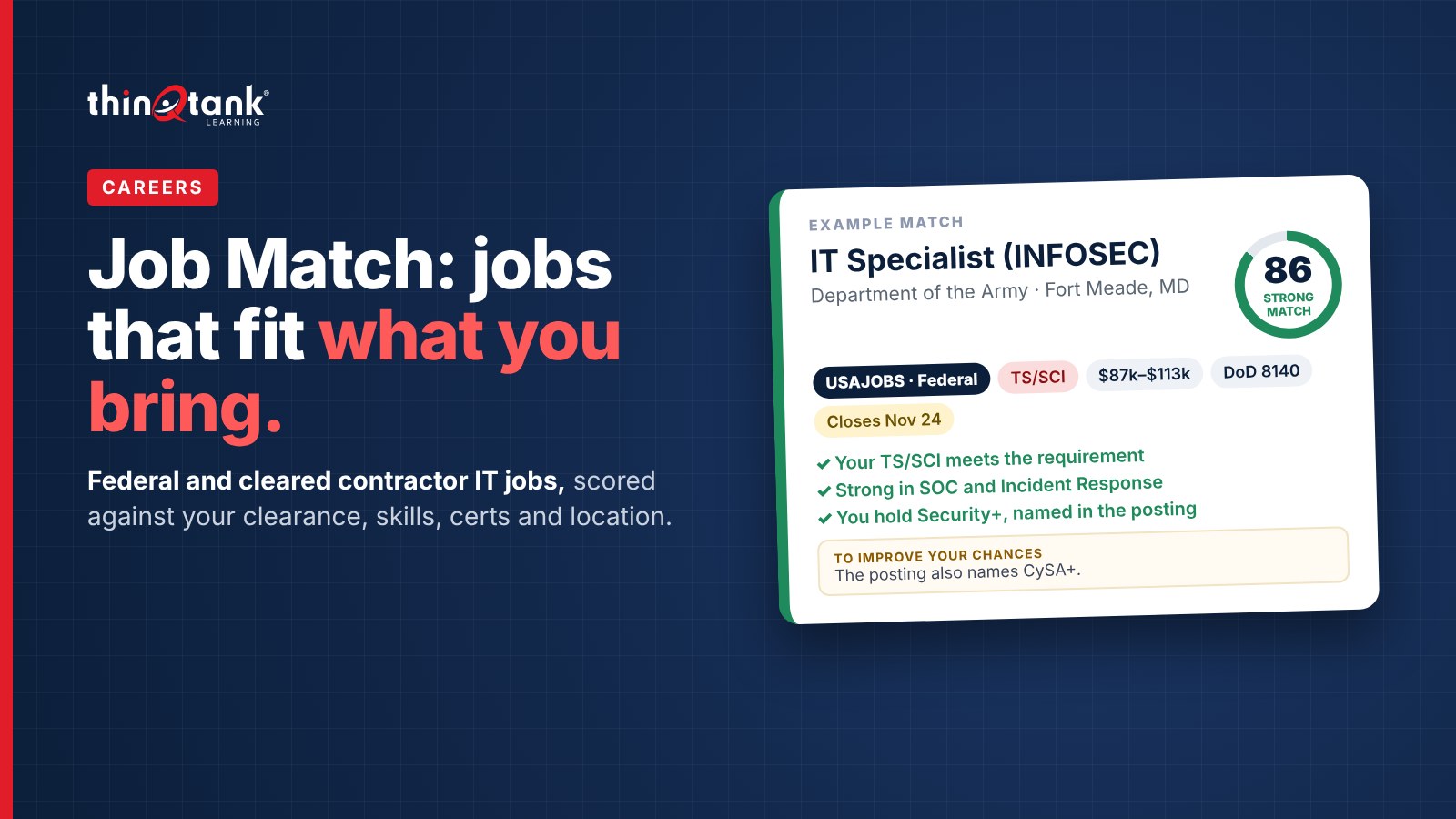
This is an example of one match card. Every job on the page is laid out the same way, so you can scan a list quickly and still see the details that decide whether to apply.
Example match (illustrative)IT Specialist (INFOSEC)
Department of the Army · Fort Meade, MD 86Strongmatch USAJOBS · Federal TS/SCI On-site $87k–$113k DoD 8140 Posted Nov 3 Closes Nov 24
- Your TS/SCI meets the TS/SCI requirement
- Strong in Security Operations, Incident Response
- You hold Security+, named in the posting
- Near you (MD)
- The posting also names CySA+. Adding it moves you up the list for this job and others like it.
- Lead your resume with the SIEM and alert-triage duties this posting lists.
Here's what each part of the card means:
- Title, employer and location. The job as the employer listed it.
- The score ring. A number from 0 to 100 and a label: Strong match (75 and up), Good match (55 to 74) or Stretch (below 55). Stretch jobs aren't out of reach. They're the ones where one cert or a little more experience would change the picture.
- Pills. The quick facts: the clearance required, remote, hybrid or on-site, the salary range when the posting gives one, a DoD 8140 flag, the date it was posted and the date it closes, so you don't miss a deadline. Federal jobs carry a navy USAJOBS · Federal pill so you can tell them apart from contractor openings at a glance.
- Why it's a match. Green check marks that spell out what lined up: your clearance meets theirs, the skills you're strong in, the certs you hold that the posting names, and how the location fits.
- To improve your chances. Specific, practical advice for that one job. That might be a cert the posting asks for, what to say about an interim or expired clearance, what to put in a cover note if you're relocating, or how to count lab, military and contract work toward the years of experience it asks for. When a course would close the gap, the tip links straight to it.
- Apply. One button that takes you to the real posting, either on USAJOBS or on the employer's own career site. You always apply directly with the employer.
Tell it what you bring
The first time you open Job Match, you fill in a short job profile. It takes a few minutes, and it's what makes every result personal.
Clearance
Your level (none, Public Trust, Secret, Top Secret or TS/SCI), whether it's active, current, interim or expired, and any polygraph (CI or full-scope).
Ten skill areas
Rate yourself from None to Expert in networking, cloud, Windows/Linux admin, SOC work, pen testing, GRC/RMF, identity and access, scripting, incident response and help desk.
Certifications
Tick what you hold, from A+, Network+, Security+ and CySA+ to CCNA, CISSP, CISM, CEH, GIAC, AWS, Azure, ITIL and PMP. Anything already on your thinQtank profile is pre-ticked.
Where you'll work
Your city, state and ZIP, and the work you'll take: remote, hybrid, on-site, and whether you're willing to relocate. You can also ask for new matches by email every week.
Your clearance stays private. It's never shown on your public profile or to other members. Job Match only uses it to score jobs for you.
Step twoHow the score is worked out
Every job is scored out of 100 across four things that recruiters screen for first. Skills carry the most weight, because that's where training changes the outcome fastest.
Skills35 Clearance30 Certifications20 Location15Clearance is checked the way an employer would check it. A higher clearance meets a lower requirement. Jobs that sponsor a clearance after hire are open to you even without one. Polygraph requirements are matched separately. Certifications earn points when you hold the ones a posting names, and DoD 8140 positions check whether your certs meet a baseline. Location favors jobs near you, plus remote work if you said you'd take it, and jobs elsewhere if you're willing to relocate.
Step threeFilter the list down
Your best matches come first. Five filters sit above the list, and each one shows how many jobs it holds, so you know what you'll get before you click.
AllStrong matchesRemoteNo clearance needed to applyNew this week- All shows every job that fits your clearance and location, best first.
- Strong matches narrows it to the jobs scoring 75 or higher. Start here when you're ready to apply.
- Remote shows fully remote roles only.
- No clearance needed to apply is the filter for anyone trying to break into cleared work. These employers will sponsor the clearance after they hire you.
- New this week shows postings from the last seven days, so a return visit gets straight to what's fresh.
The list loads 20 jobs at a time, and Show more matches brings in the next batch. At the top of the page you'll also see the date the listings were last updated.
When things changeUpdate your answers any time
Passed a cert? Got your clearance? Moved? Once your profile is saved, a bar at the top of the page shows the date your matches are based on, with two options:
- Update my answers opens your profile with everything already filled in. Change what's different and save, and your matches are re-scored right away.
- Start over clears your saved answers completely so you can begin from a blank profile. It asks you to confirm first, so you can't clear it by accident.
This is where Job Match and training work together. Earn the cert a stretch job asked for, tick the box, and watch that job, and others like it, move up your list.
Who it helpsBuilt for people moving into cleared IT
Veterans and transitioning service members
Put an active or current clearance to work. Your military experience counts toward years of experience, and the tips tell you how to present it.
Career changers
Use the No clearance needed to apply filter to find employers who'll sponsor you, and see which entry certs open the most doors.
Students and new graduates
See which skills and certs the jobs you want actually ask for, so your study plan points straight at a paycheck.
Working IT professionals
Find the next step up, compare federal and contractor pay side by side, and spot the one cert holding a strong match back.
Find the jobs that fit you
Job Match is free for every thinQtank member. Build your profile once and see your matches in minutes.
Open Job Match Book a 10-minute call— Scott
Sources